


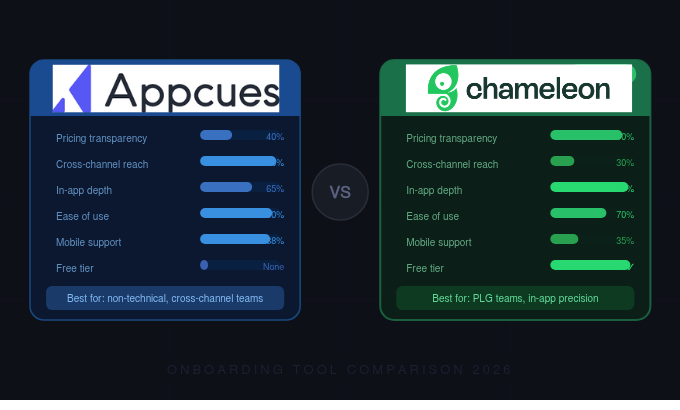


Chameleon edges out the win here. While Appcues brings a strong cross-channel approach with in-app, email, and push messaging, Chameleon's deep focus on in-app product adoption - particularly its flexible targeting and styling capabilities - makes it the better pick for most product-led SaaS teams. Your mileage will vary based on whether you need multi-channel reach or precision in-app experiences.
Comparing pricing between Appcues and Chameleon used to be straightforward, but Appcues made things murkier in recent years by removing published pricing from their website entirely. As of 2026, all three Appcues tiers - Start, Grow, and Enterprise - require you to book a demo before you get any numbers. That's a friction point worth noting if you're a smaller team trying to evaluate tools quickly.
Chameleon, by contrast, has historically been more transparent. They offer a free Startup plan (limited features, but enough to test the waters), a Growth tier for scaling teams, and an Enterprise plan. Published pricing means you can self-qualify before hopping on a sales call, which matters if you're running a product-led motion and want to move fast.
The real question is value for money. Appcues bundles in cross-channel capabilities: email, push notifications, and in-app messaging all under one roof. If you're currently paying for separate tools to handle those channels, the consolidation could justify a higher price tag. Chameleon is laser-focused on in-app experiences, so you'll likely still need a separate tool for email and push.
For early-stage SaaS companies watching their burn rate, Chameleon's free tier is a genuine advantage. You can build a few tours and tooltips, validate whether in-app guidance actually moves your activation metrics, and upgrade once you have data to justify the spend. With Appcues, you're committing to a sales conversation before you even know if the tool fits your workflow.
Verdict: This depends on your situation. If you need multi-channel messaging bundled into one platform, Appcues might deliver better value despite the opaque pricing. If you want to start small, test quickly, and keep costs predictable, Chameleon is the safer bet - especially for teams under 50 employees or those still finding product-market fit.
This is where the comparison between Appcues and Chameleon gets interesting, because these tools have diverged meaningfully in their product philosophies.

Appcues has evolved beyond a pure in-app guidance tool. Their AI-powered growth engine follows a four-step loop: Understand user behavior, Decide what experience to show, Act by delivering that experience, and Learn from the results. It's an ambitious framework that positions Appcues as more of a lifecycle messaging platform than a simple tooltip builder.
The in-app pattern library is solid: modals, slideouts, banners, launchpads, tooltips, hotspots, checklists, and pins. You can build NPS surveys and microsurveys directly in the tool. Design customization through themes and CSS means you're not stuck with out-of-the-box styling.
What really differentiates Appcues is the cross-channel piece. Workflows with behavioral logic can trigger not just in-app messages but also emails and push notifications. So if a user abandons a checklist mid-way through, you can follow up via email the next day. That kind of behavioral cohort-driven messaging is powerful for retention and expansion plays, especially in B2B SaaS where users don't always live inside your product every day.
Dynamic content is another standout feature. You can personalize messages based on user properties, behavioral data, or segment membership - which means the same flow can feel different for a trial user versus a power user on an enterprise plan.
Chameleon takes a different approach. Rather than spreading across channels, they've gone deep on making in-app experiences feel truly native to your product. Their styling engine is one of the most flexible in the category - you can match your brand down to the pixel without fighting the tool.
Chameleon's core patterns include product tours, tooltips, launchers (persistent in-app widgets), microsurveys with branching logic, and a helpbar that functions as a searchable command center within your app. The helpbar is particularly clever: it gives users a way to self-serve answers without leaving their workflow, which reduces support tickets and keeps people in a productive flow state.
Where Chameleon really shines is targeting and segmentation. You can trigger experiences based on URL, user properties, events, and even CSS selectors on the page. This granularity matters when you're trying to show the right message to the right user at the right moment - the difference between a helpful nudge and an annoying popup.
Chameleon also supports rate limiting (so users don't get bombarded with multiple experiences at once) and A/B testing on tours and tooltips. If you're serious about running experiments to find your product's "aha moment," that testing capability is essential. You can compare behaviors of retained versus churned users, then validate whether a specific tooltip or tour actually moves the needle on activation.
Appcues lacks some of the in-app depth that Chameleon offers. The helpbar concept, the granular CSS selector targeting, and the rate limiting controls are areas where Chameleon has a clear edge. Appcues compensates with breadth, but if your primary goal is nailing the in-app experience, that breadth is less relevant.
Chameleon's weakness is the flip side: no native email or push notification support. If you need to reach users outside your app, you'll need to integrate with a separate tool. That's not a dealbreaker, but it does add complexity and cost to your stack.
Verdict: Chameleon wins on features for most product-led teams. The depth of in-app targeting, native-feeling UI patterns, and built-in experimentation tools give product teams more control over the experiences that matter most: what happens when someone is actually using your software. Appcues is the stronger choice only if cross-channel messaging is a core requirement.
Both tools market themselves as "no-code" solutions, and both deliver on that promise to varying degrees. But the experience of actually using them day-to-day is quite different.
Appcues has long been known for its approachable interface. The visual builder is intuitive, and non-technical team members - think product marketers or customer success managers - can create flows without engineering support. The learning curve is gentle. You can have a basic modal or tooltip live within an hour of setup. Appcues explicitly positions itself as built for "non-technical teams with a need for speed," and that's an honest description.
The trade-off is that Appcues can feel limiting once you want to do something more complex. Advanced targeting, custom CSS overrides, or multi-step behavioral workflows require more time to configure, and you may eventually bump into the walls of what the visual builder can handle without developer involvement.
Chameleon's builder is also visual and no-code, but it assumes a slightly more technical user. The interface gives you more knobs to turn: CSS customization is deeper, targeting rules are more granular, and the overall UX feels like it was designed for product managers who are comfortable with data and segmentation logic. That's not to say a marketer can't use it, but the ramp-up time is a bit steeper.
One area where Chameleon excels is the preview and testing experience. You can preview exactly how a tour or tooltip will look in your live app before publishing, which reduces the "deploy and pray" anxiety that comes with in-app messaging tools.
Verdict: Appcues wins on ease of use. If your team skews non-technical or you need to ship experiences quickly with minimal training, Appcues is the smoother ride. Chameleon's extra power comes at the cost of a slightly steeper learning curve, though most product teams will find it manageable within a week or two.
Both platforms connect with the tools you'd expect in a modern SaaS stack, but the emphasis differs.
Appcues offers integrations across CRM, product analytics, marketing automation, session recording, automation tools, and team collaboration platforms. They also provide webhooks and a public API, which gives engineering teams flexibility to build custom connections. The marketing automation integrations are particularly relevant given Appcues' cross-channel ambitions - connecting to your email platform means behavioral triggers can flow between in-app and out-of-app channels.
Chameleon integrates well with product analytics tools like Amplitude, Mixpanel, and Heap, plus CRMs like HubSpot and Salesforce. Their Segment integration is strong, which matters if you've built your data infrastructure around that platform. Chameleon's API is well-documented and supports custom event tracking.
Verdict: If your priority is connecting in-app data to marketing automation and email platforms, Appcues has the edge. If you're focused on piping in-app experience data into your product analytics stack for cohort analysis and experimentation, Chameleon's integrations are purpose-built for that workflow. Pick based on where your data needs to flow.
Technically yes, but it's rarely a good idea. Running two in-app messaging tools simultaneously creates conflicts: overlapping tooltips, competing modals, and a confusing user experience. Pick one for in-app and supplement with dedicated tools for other channels if needed.
Chameleon's strength in contextual, targeted in-app messaging makes it particularly effective for re-engaging users who show signs of disengagement. Triggering a specific tooltip or survey based on behavioral signals (like a user skipping a key feature for two weeks) is where Chameleon's targeting precision pays off. Appcues can accomplish similar goals but adds the ability to follow up via email if users aren't logging in.
Both require a one-time installation (typically a JavaScript snippet or integration through a tag manager). After that, day-to-day use is largely no-code. Chameleon may need occasional developer input for advanced CSS customization or complex event tracking. Appcues is generally lighter on engineering dependencies.
Yes, with limitations. You can create a limited number of tours and tooltips, which is enough to run a meaningful test. It won't give you access to advanced features like A/B testing or the helpbar, but it's a legitimate way to evaluate whether the tool fits your product before committing budget.
Both support segmentation based on user properties and behavioral events. Chameleon goes further with CSS selector-based targeting (show a tooltip only when a specific UI element is visible) and more granular rate limiting rules. Appcues leans on its AI engine to recommend segments and personalization strategies.
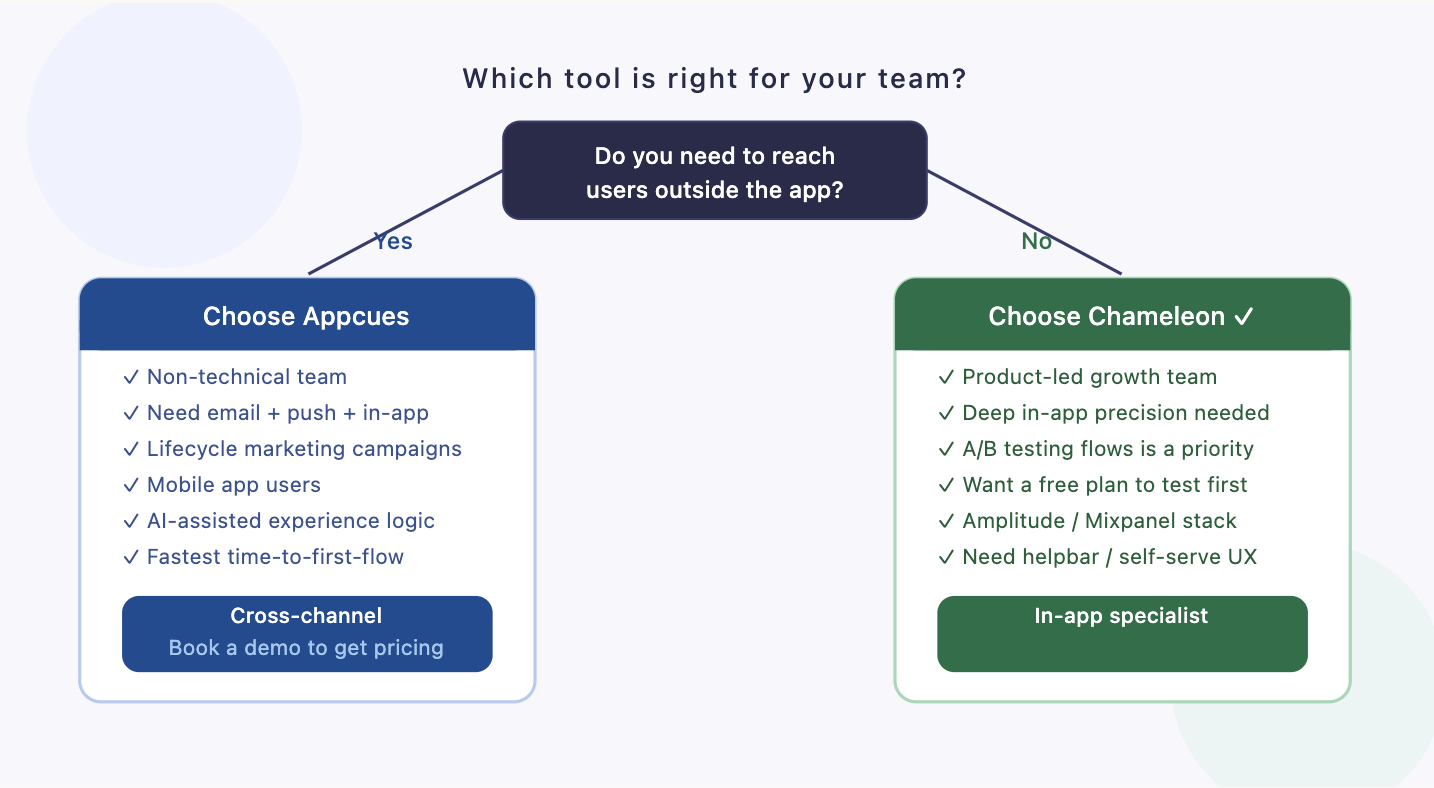
Chameleon is the better choice for most SaaS teams in 2026. The reasoning is straightforward: if you're building a product-led company, the in-app experience is your highest-leverage surface area. Chameleon gives you more control over that surface with deeper targeting, better styling flexibility, A/B testing, and a free tier that lets you validate before you invest.
Appcues remains a strong tool, and it's the right pick for teams that genuinely need cross-channel orchestration from a single platform. If your user engagement strategy depends heavily on email and push alongside in-app messaging, Appcues' breadth is a real advantage. But for teams focused on activation, feature adoption, and in-app retention, Chameleon's depth wins.
The best tool is the one that actually gets used to run experiments and improve your product experience. If you're unsure which direction to take - or you want help designing the actual flows and strategies that go inside these tools - the team at Flow specializes in exactly this kind of work for SaaS companies. Get in touch to talk through your activation and retention strategy before you commit to a platform.


